
Accessibility-First UX: Key Takeaways
- Accessibility added at QA is structurally late. It forces remediation against architecture decisions that were already wrong.
- The European Accessibility Act became enforceable on 28 June 2025, pulling B2B software into scope that previously ignored conformance.
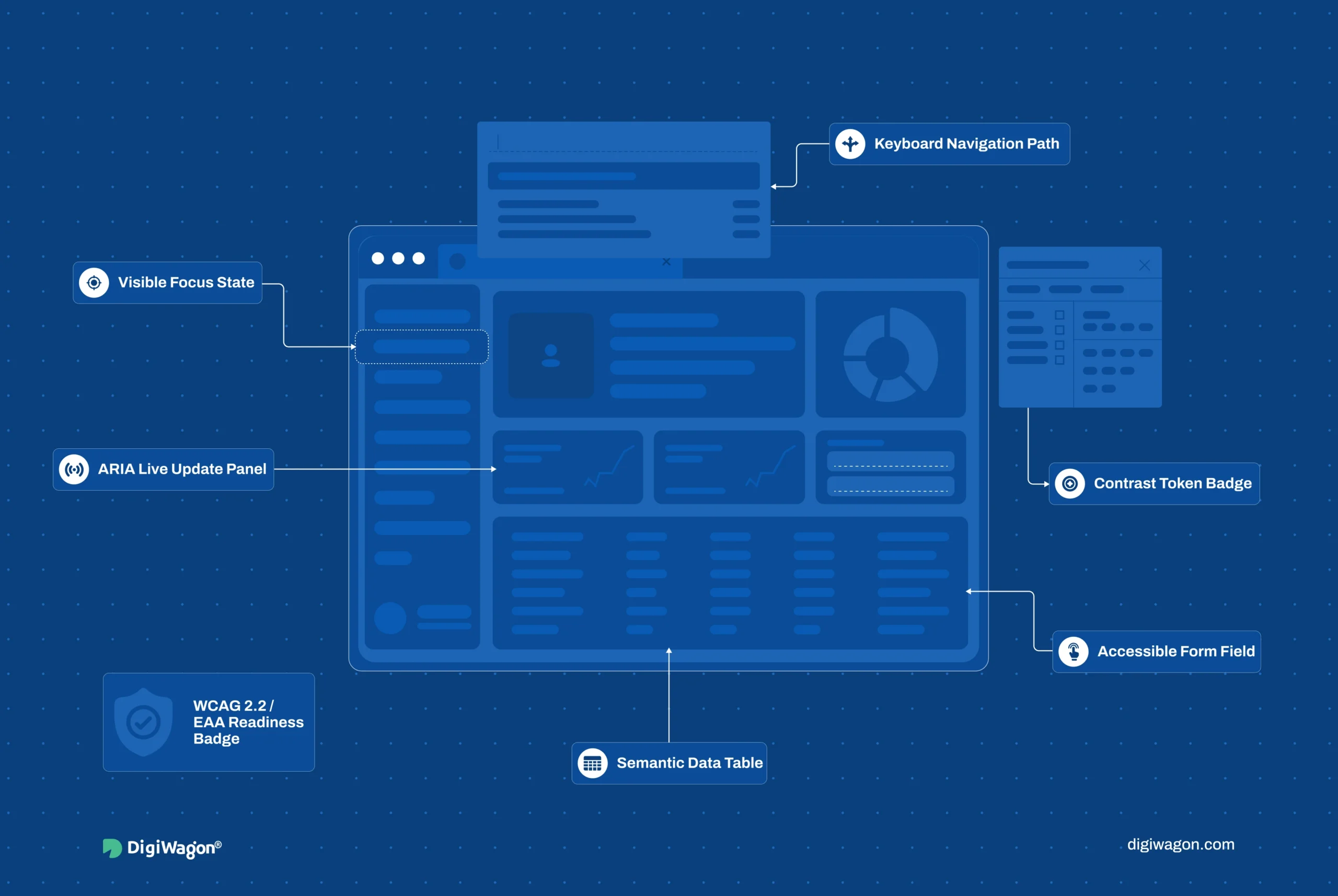
- The patterns auditors check most on data-dense B2B surfaces are focus management, ARIA live regions, semantic structure, and keyboard-only operation.
- Each pattern has a correct home: design system first, framework primitives second, QA last. Reverse that order and cost multiplies.
- Greenfield products bake accessibility into primitives once; legacy products need a phased remediation path ranked by audit exposure.
Accessibility-first UX is the practice of engineering WCAG 2.2 conformance into the design system and framework layer before a single screen reaches QA. It treats focus order, ARIA semantics, and keyboard operability as architecture decisions, not test-phase fixes. The result is a product where accessibility is a property of the components, so every screen inherits it instead of earning it one audit at a time.
Why Most B2B Accessibility Programs Fail
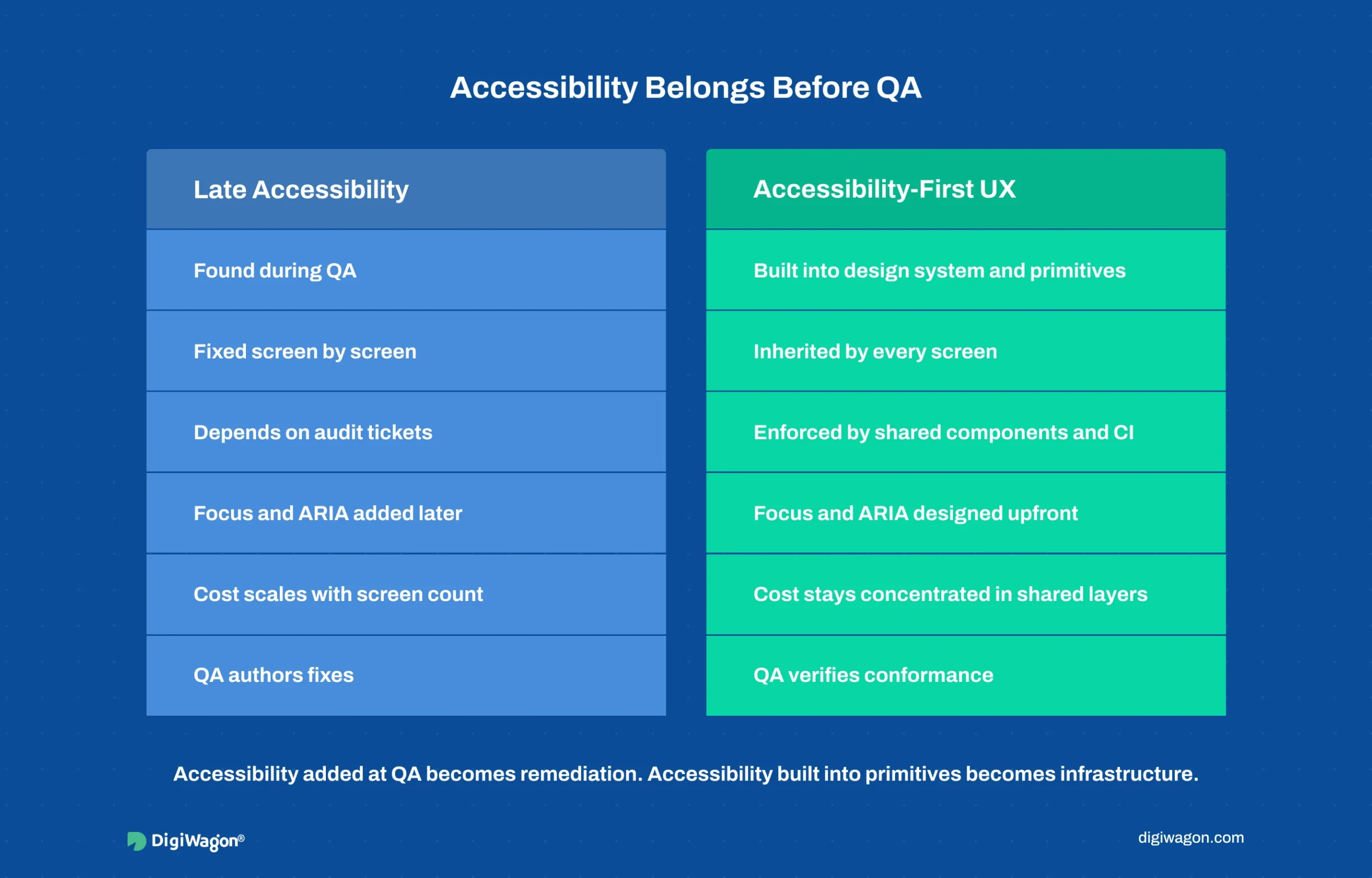
The failure is almost never a lack of effort. Teams run audits, file tickets, and fix issues. The problem is timing. Accessibility gets treated as a QA-phase checklist instead of an architecture decision, so every fix fights against choices that were locked in months earlier.
The WebAIM Million report (WebAIM, 2024) scanned the top one million home pages and found detectable WCAG failures on 95.9 percent of them, averaging more than 56 errors per page. Most of those errors trace to a handful of structural causes: missing form labels, low contrast, and empty links. These are not hard problems to solve once. They are expensive problems to solve 56 times across a shipped product because no shared layer enforced them.
Four failure modes recur in B2B software:
- QA-phase discovery. Accessibility surfaces only when an audit runs near launch, against components that were never built to support it.
- No accessible primitives. Each squad hand-rolls its own inputs and modals, so focus traps and ARIA semantics are reinvented (badly) per component.
- Visual-only design specs. Designs specify colour and layout but not focus order, ARIA roles, or keyboard interaction, so engineers improvise.
- Tooling mistaken for coverage. Automated scanners catch roughly a third of WCAG issues. The rest, focus management and screen-reader semantics, need manual and structural work.
What Does EAA Enforcement Actually Require?
The European Accessibility Act, Directive (EU) 2019/882, became enforceable on 28 June 2025. It pulled a large category of B2B and commercial software into accessibility scope that previously assumed the rules applied only to the public sector. The technical baseline it points to is WCAG 2.2 Level AA.
What changes in practice is not the standard. WCAG has existed for years. What changes is enforcement and the buyer’s risk calculus. A procurement team in the UK, Germany, or the wider EU now treats conformance as a gating requirement, because a non-conformant product creates legal exposure for them, not just for the vendor.
Auditors do not score aesthetics. They check conformance against specific success criteria. On data-dense B2B surfaces, the criteria that fail most often are:
| WCAG 2.2 Area | What Auditors Check | Common B2B Failure |
|---|---|---|
| Focus visible + focus order (2.4.7, 2.4.3) | Keyboard focus is visible and follows a logical order | SPA route changes drop focus into the void |
| Name, role, value (4.1.2) | Interactive elements expose correct semantics | Custom dropdowns built from divs with no role |
| Info and relationships (1.3.1) | Structure is programmatically determinable | Data tables without header associations |
| Status messages (4.1.3) | Dynamic updates announced without focus change | Live data refreshes silent to screen readers |
The W3C WCAG 2.2 specification (W3C WAI, 2023) is the authoritative source for each criterion. The pattern across all of them is the same: conformance is decided by how components are built, not by what a QA pass catches at the end.
For teams facing a conformance deadline, the audit decision sits inside a broader cadence question covered in the pillar on UX audits and compliance deadlines.
Which Engineering Patterns Survive an Accessibility Audit?
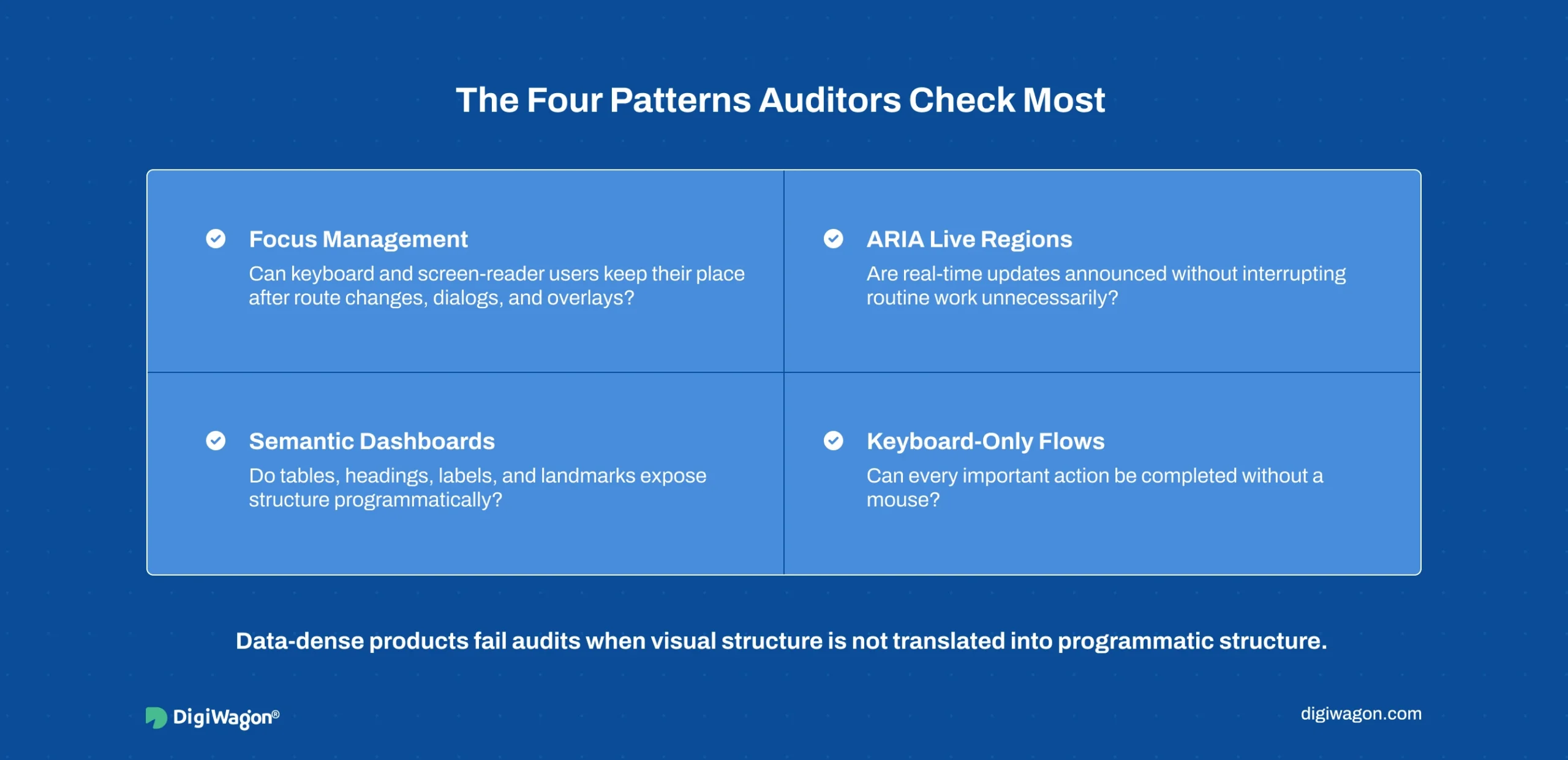
Four patterns carry most of the conformance weight on B2B interfaces. Each is an engineering practice, not a design afterthought.
Focus management in SPAs. Single-page apps in React or Vue change views without a page reload, so the browser does not reset focus the way it does on a full navigation. Without explicit handling, a keyboard or screen-reader user loses their place on every route change. The pattern is to move focus deliberately to the new view’s heading or main landmark on each navigation, and to trap focus inside modals so tabbing cannot escape behind the overlay.
ARIA live regions for real-time data. Compliance dashboards, transaction monitors, and screening queues update without user action. A sighted user sees the change. A screen-reader user hears nothing unless the update lands in an ARIA live region. The WAI-ARIA Authoring Practices Guide (W3C WAI, 2023) specifies aria-live politeness levels: polite for routine updates, assertive for alerts that must interrupt.
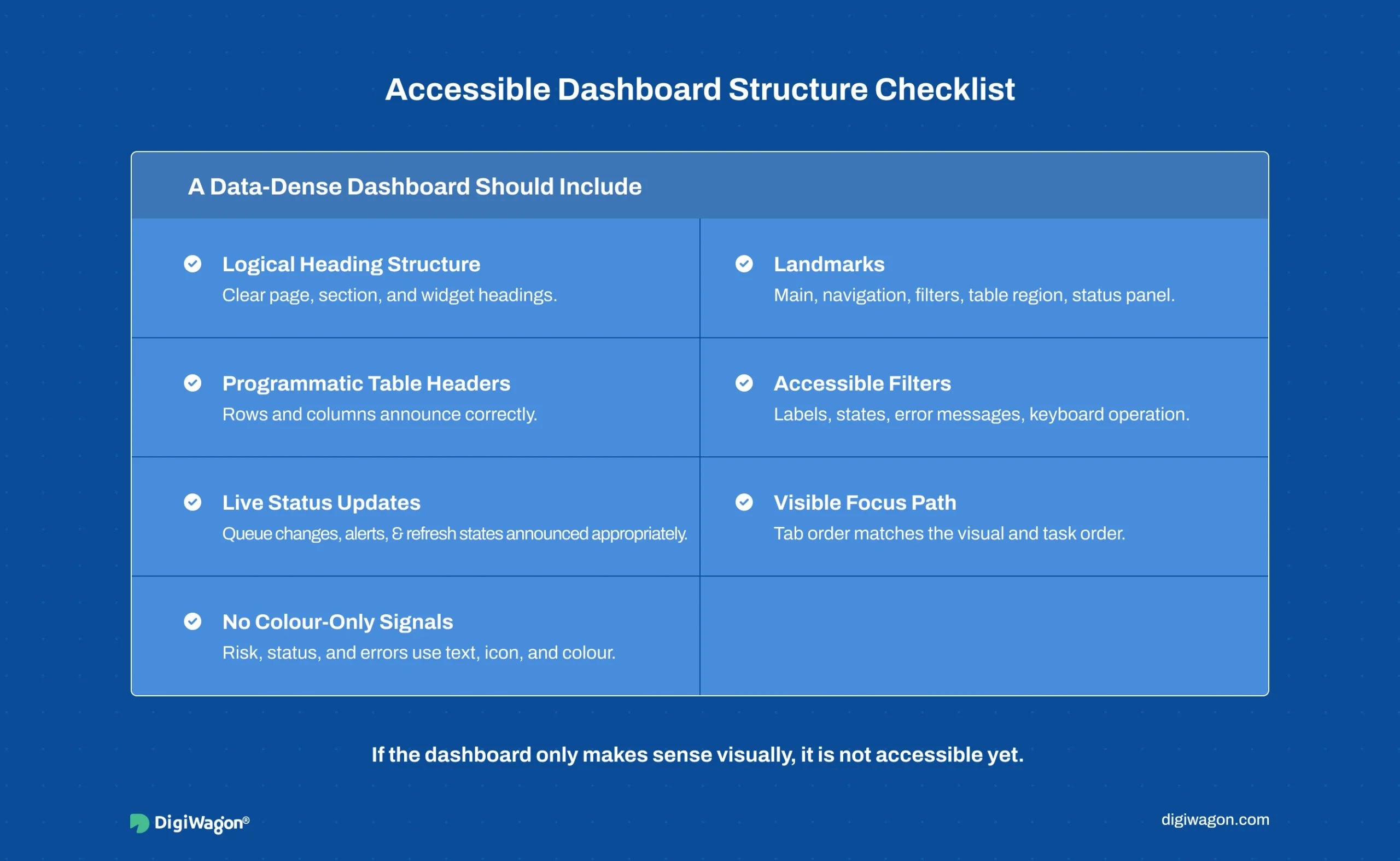
Semantic structure for data-dense dashboards. Data tables need programmatic header associations so a screen reader can announce “row: account 4471, column: risk score, value: high” instead of reading 40 unlabelled cells. This is scope attributes, proper th elements, and caption associations, none of which a visual design spec captures unless someone writes it down.
Keyboard-only operator flows. Compliance triage operators often work faster on the keyboard than the mouse. Every action a mouse can perform must have a keyboard path, with a visible focus indicator and a logical tab order. The WAI ACT Rules (W3C WAI, 2023) define testable checks for exactly these behaviours, which is what an auditor’s tooling runs against.
Automated engines like Deque’s axe-core (Deque, 2024) catch the markup-level subset of these reliably. The focus-management and live-region behaviour needs structural design and manual verification, which is why tooling alone never closes the gap.
Where Should Each Accessibility Pattern Live?
This is the load-bearing decision of the whole playbook. The same four patterns can be implemented at three layers, and the layer you choose decides the cost.
| Pattern | Design System | Framework Primitives | QA |
|---|---|---|---|
| Focus management | Spec focus order per pattern | Router-level focus reset, modal focus trap | Verify, don’t author |
| ARIA semantics | Roles defined per component | Baked into primitive markup | Verify, don’t author |
| Keyboard operability | Interaction spec per component | Default in every interactive primitive | Verify, don’t author |
| Contrast + focus visibility | Token-level guarantee | Inherited from tokens | Verify, don’t author |
The order is design system first, framework primitives second, QA last. When accessibility lives in the design system and the primitive layer, every screen inherits conformance and QA’s job shrinks to verification. When it lives only in QA, every screen earns conformance separately and the cost scales with screen count.
The economics are stark. Bake WCAG semantics into roughly a dozen primitives once, and a thousand screens inherit them. Retrofit the same semantics screen by screen, and the work never ends because new screens ship faster than old ones get fixed. Teams planning this can see how design audit services and usability testing services sequence the verification layer after the architectural work, not instead of it.
The Architectural Position: Accessibility Is a Framework Decision, Not a QA Gate
DigiWagon’s position, formed across compliance and RegTech delivery, is that accessibility belongs in the same architectural tier as focus management and audit trails, the patterns that have to be designed in or retrofitted expensively. The work that makes a screening queue auditable, deterministic, and reconstructable shares its structure with the work that makes it accessible: both are properties the component carries, not behaviours a test phase adds.
Concretely, when a product’s framework primitives encode name-role-value semantics, live-region announcements, and keyboard operability from day one, conformance becomes the default state of the system. When they do not, every audit cycle pays remediation interest on the original architecture decision. The pattern that keeps a compliance dashboard’s audit trail in the primary view, rather than a hidden log, is the same discipline that keeps its status updates in an ARIA live region rather than a silent DOM mutation. Accessible structure and auditable structure are the same engineering instinct applied to two requirements.
This is why the framework and design-system choice is the real accessibility decision. A component library without accessible primitives forces a retrofit no QA budget can outrun. The cross-references between focus-management patterns and the E-E-A-T framework applied to UX show how the same structural rigour extends from internal compliance surfaces to public-facing trust signals.
How Do You Remediate a Legacy Product Versus Build Greenfield?
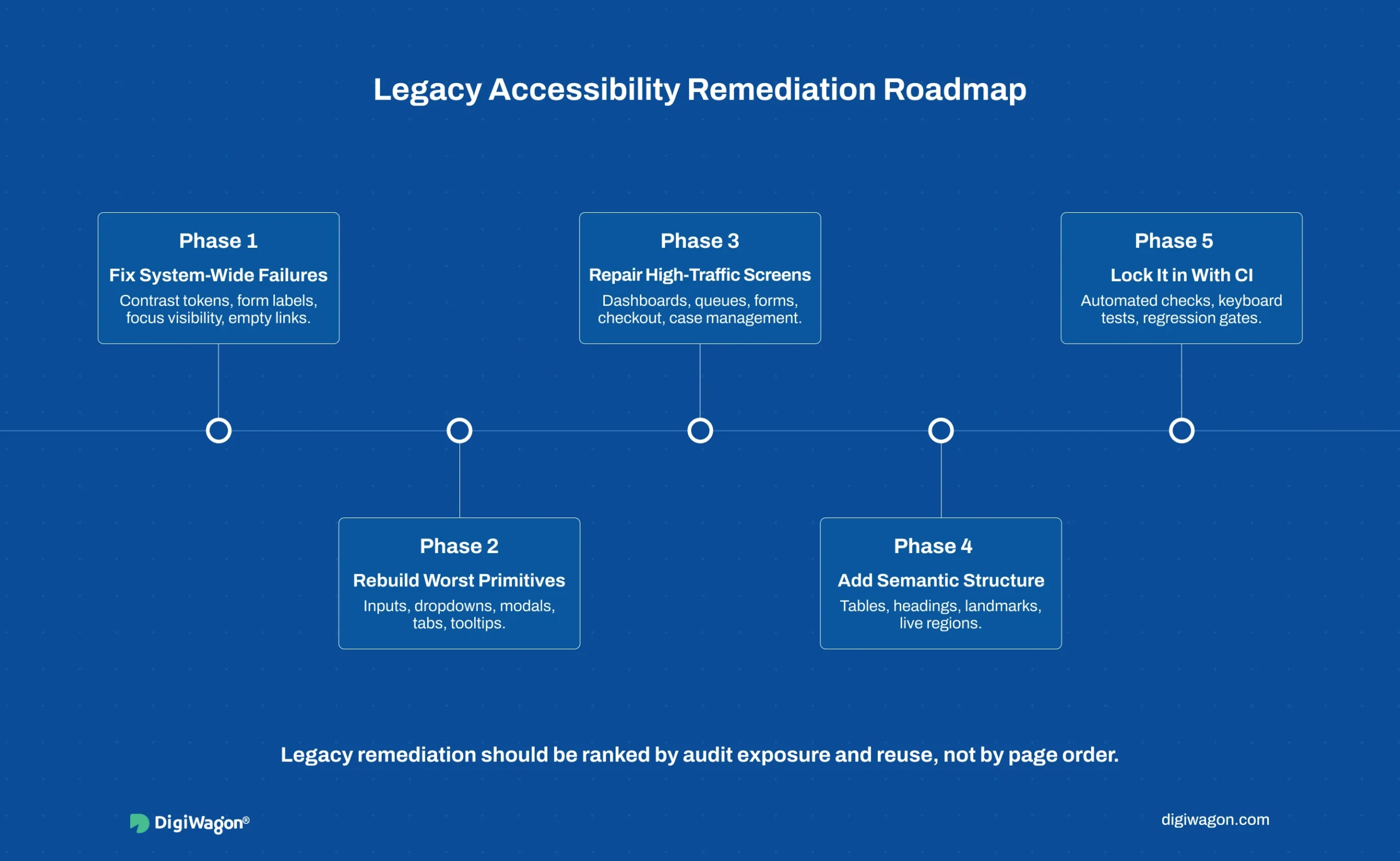
The right path depends on whether the architecture already exists.
Greenfield (from scratch). Bake conformance into primitives before the first feature ships. Define focus order, ARIA roles, and keyboard interaction as part of each primitive’s spec. Set contrast and focus-visibility guarantees at the token layer. Run automated checks in CI from the first commit. Greenfield accessibility is cheap because it is never a retrofit.
Legacy (phased remediation). A shipped product cannot pause for a rewrite, so remediation is ranked by audit exposure, not by screen:
- Triage by criterion severity and reach. Fix the failures that appear on every screen first, contrast tokens, missing form labels, focus visibility, because one fix propagates widely.
- Rebuild the worst primitives. Replace hand-rolled inputs, dropdowns, and modals with accessible versions, so dependent screens inherit the fix.
- Add structural semantics to high-traffic surfaces. Data tables, live regions, and landmark structure on the screens operators use most.
- Lock it in with CI checks. Add automated conformance gates so fixed screens cannot regress.
Both paths converge on the same end state: accessibility as a property of shared layers, verified by QA rather than authored by it. The difference is only whether you pay the architecture cost upfront or in instalments.
Building Accessible Software With DigiWagon
DigiWagon engineers WCAG 2.2 and EAA conformance into the design system and framework layer for enterprise and regulated platforms. Our work covers:
- Accessible primitive libraries with focus management and ARIA baked in
- WCAG 2.2 Level AA audits with prioritised remediation roadmaps
- Keyboard-only and screen-reader flows for compliance and data-dense surfaces
- CI-integrated conformance gates to prevent regression
For the broader practice, see enterprise UI/UX design and engineering services. Accessibility carries particular weight in RegTech compliance interfaces and healthcare software, where the same audit-grade rigour applies.
Treating Conformance as Architecture
Accessibility programs do not fail because teams do not care. They fail because the work arrives after the decisions that determine its cost. Move focus management, ARIA semantics, and keyboard operability into the design system and framework primitives, and conformance stops being a recurring audit scramble and becomes a property the product already has. The standard is fixed and public. What separates products that pass from products that perpetually remediate is whether accessibility was an architecture decision or a test-phase afterthought. Decide it early, encode it in the layers that every screen inherits from, and the audit becomes a verification, not a reckoning.
Facing an EAA Conformance Deadline?
Our design and engineering teams build accessibility into the architecture, so conformance is the default state of your product.